System, Backup, and Operations
Aivory v2.4.7 and the current post-release main branch. This covers the "System" rail (Announcement, Email service, Storage & uploads, Legal & contact, Logging & privacy, Backup & Migration), the "Data & operations" tabs, Moderation and Voice under "Capabilities & integrations", and the separate domain/workspace administration pages. Screenshots show the Chinese admin UI; English labels are cited inline.
System settings decide how the instance sends mail, stores objects, logs requests, presents legal information, and runs backups; the operations pages help admins observe users, models, files, and feedback. Treat them as ongoing operations, not a one-time form during install.
Admin map
| Rail | Tab | Section here |
|---|---|---|
| AI & models | Moderation | Moderation and voice |
| Capabilities & integrations | Voice | Moderation and voice |
| System | Announcement / Email service / Storage & uploads / Legal & contact / Logging & privacy / Backup & Migration | sections below |
| Data & operations | Usage & billing / Usage / Content resources / Files / User feedback | Operations rhythm |
Organization access is documented on its own Domain enrollment and workspace access page. Use /admin/workspaces for workspace creation and owner changes, and /admin/domains for exact email-domain enrollment and personal-space locks; do not treat the global email allowlist as a replacement for these rules.
Email service
"System → Email service" configures SMTP: host, port, username, password, sender address, and TLS mode, with adjustable verification/reset templates. Email powers registration verification (6-digit code, 10-minute validity), password reset, and operational notices — ship it early on any user-facing deployment.
| Field | Description | Example / default |
|---|---|---|
| Host / Port | SMTP server address and port | smtp.example.com; 465 or 587 per provider |
| Username / Password | Login credentials; prefer an app-specific password | provider-issued |
| From address | What recipients see; should belong to a controlled domain | no-reply@aivory.example.com |
| TLS mode | Direct TLS (implicit SSL, usually 465) or STARTTLS (usually 587) | per provider docs |
| Templates | Subject/body for verification and reset mail | defaults are fine to ship |
Requirements and validation:
- Use provider-issued SMTP credentials or an app-specific password; never reuse an admin login password.
- The sender address should belong to a controlled domain with SPF, DKIM, DMARC, or the provider's domain verification in place — otherwise verification mail lands in spam.
- Match the port to the mode: direct TLS (implicit SSL) versus STARTTLS, per the provider's docs.
- After saving, test end to end with a non-admin mailbox: delivery, code-based sign-in, and the full password-reset flow.
"Require email verification" and "forgot password" are effectively unavailable. When debugging, never print verification codes or SMTP passwords into public logs.
Email troubleshooting quick lookup
| Symptom | Check first |
|---|---|
| Test connection fails: connection refused | Port/TLS-mode mismatch (465 direct TLS vs 587 STARTTLS) |
| Auth failure (535) | Web login password used instead of an app-specific password; account has 2FA demanding an app password |
| Verification mail lands in spam | Missing SPF/DKIM/DMARC on the sender domain; from-address differs from the authenticated identity |
| "Sent" in logs but user got nothing | Recipient gateway rejected it; advise whitelisting or change sender domain |
| Correct code reported invalid/expired | 10-minute TTL and 5-try cap; each "resend" burns the previous code — expected behavior |
Storage and uploads
"System → Storage & uploads" centralizes object storage, archive retention, and upload policy (the RAG-side boundaries live in Knowledge bases, RAG, and storage):
| Block | Key fields | Notes |
|---|---|---|
| Object storage | Provider (local / S3 / Aliyun OSS), endpoint, bucket, prefix, AccessKey | Default local: avatar-type objects in the local object dir; uploads and artifacts under DATA_DIR. Move to controlled object storage for multi-replica, cross-node access, or MinerU |
| Upload policy | Max image size (default 5 MB), max non-image file size, allowed extensions | None may exceed the server hard cap MAX_UPLOAD_BYTES (default 50 MiB); blank extensions = safe default set |
| Sandbox archives | Archive retention days | Default 30; how long persistent-workspace tars survive |
| Vector maintenance | Check / rebuild entry point | Same facility as the Backup page's vector check |
| Storage cleanup | Pending-deletion view | Observe async physical sweeps after user/file deletions |
Use a separate, least-privilege account for object storage: only the needed bucket/prefix read/write/presign rights — never a whole-cloud admin key; configure lifecycle, versioning, encryption, and access logging. After any endpoint, bucket, region, or key change, re-test upload, download, preview, parsing, share snapshots, and deletion before migrating real files.
Logging and privacy, legal and contact
"System → Logging & privacy" controls request-log verbosity (runtime setting keys log_full_requests / log_errors_only / log_request_bodies): whether full requests are logged, errors only, and whether request bodies are recorded. Principles:
- Never log provider API keys, OAuth client secrets, payment signatures, JWTs, refresh tokens, complete user files, or full private prompts (the policy switches trade diagnostic depth against exactly this risk).
- Prefer time, request ID, sanitized error codes, and aggregate metrics when triaging; the per-request diagnostic fields on the Usage page are already sanitized.
- Set retention and access for logs; log exports can also carry user metadata.
- Assign owners and approvals for data export, deletion, backup restore, and third-party transfers.
"System → Legal & contact" maintains the terms of service, privacy policy, and operator contact. A public service needs a real, actionable contact and a privacy notice consistent with actual data flows (e.g. document the outbound path to MinerU/web-search providers if enabled).
Announcements and content operations
"System → Announcement" maintains one global notice shown when users open the app:
| Field | Description | Limit |
|---|---|---|
| Show announcement | Master switch; off clears everything | — |
| Must read | Users wait 5 seconds before closing or opting out | — |
| Allow "don't show again" | Off re-displays the notice on every visit | — |
| Title | Plain text | ≤ 120 characters |
| Image | Link or PNG/JPG upload | ≤ 256 KB |
| Body | HTML supported; line breaks via <br> | Preview before publishing |
Test display scope, dismissal behavior, and mobile layout with a test account; urgent notices should stay terse and must not embed sensitive internal details or unverifiable external scripts. Prompts, skills, and image styles that touch all users deserve a small-canary rollout with a fast disable/rollback path.
Moderation and voice
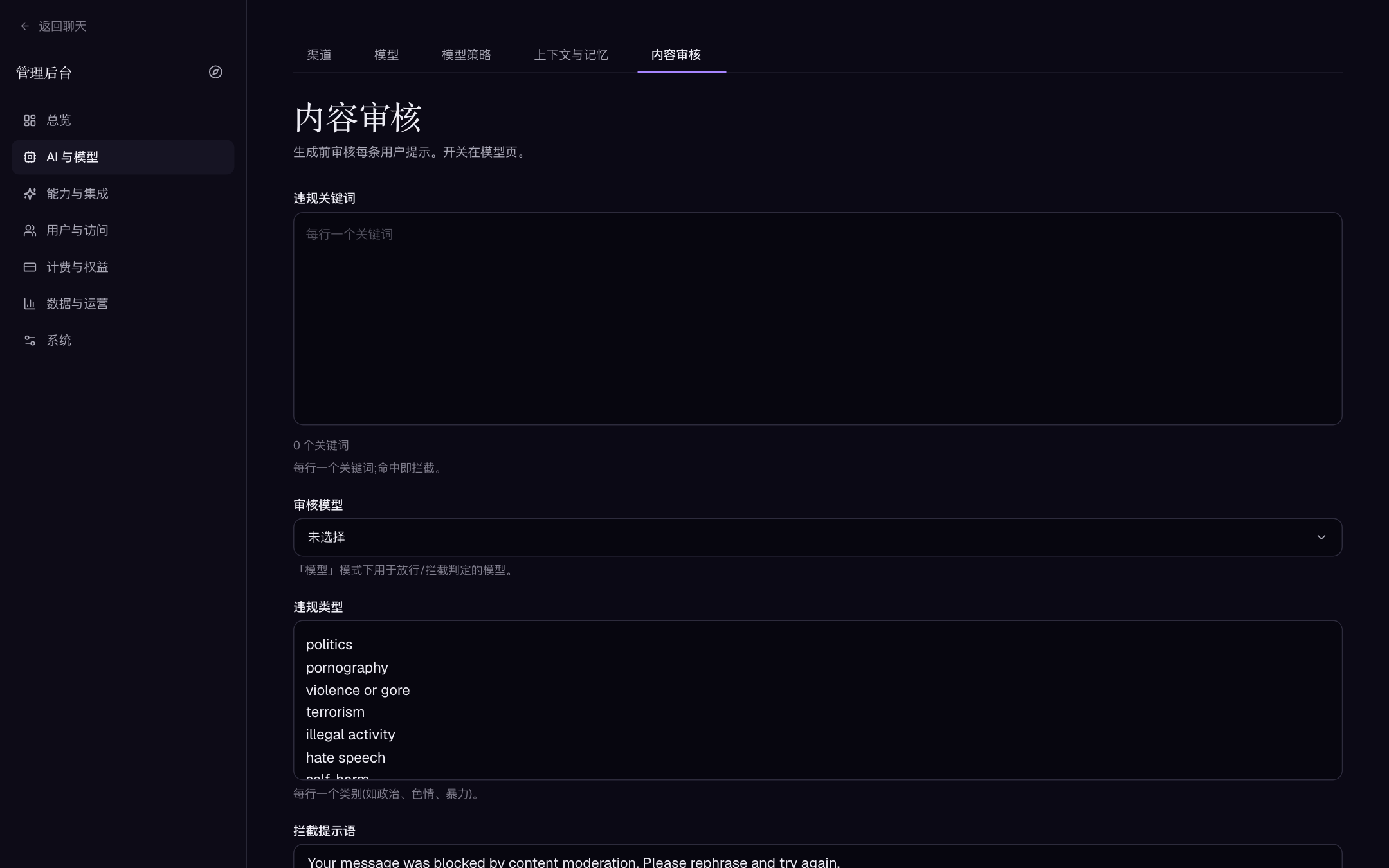
Moderation ("AI & models → Moderation") screens each user prompt before generation (history excluded); the switch itself is per model on the model editor, choosing keyword or model mode:
| Field | Description |
|---|---|
| Violation keywords | One per line; a hit blocks the prompt |
| Moderation model | The model judging allow/block in "model" mode |
| Violation categories | One per line (e.g. politics, sexual, violence) as model-mode guidance |
| Block message | What the user sees when a prompt is blocked |
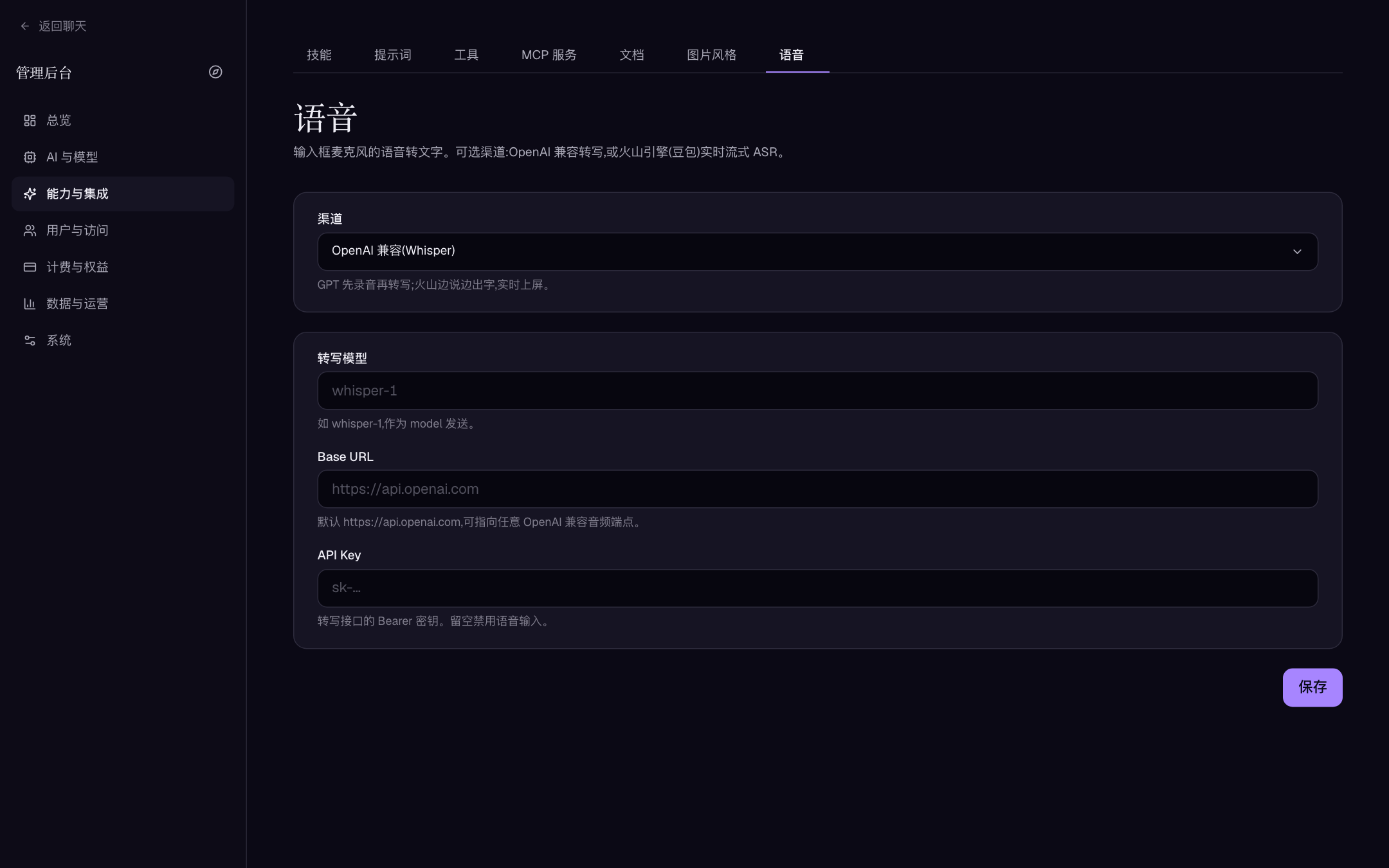
Voice ("Capabilities & integrations → Voice") configures composer speech-to-text with two provider choices:
| Provider | Character | Credentials |
|---|---|---|
| OpenAI-compatible (Whisper) | Record first, transcribe after | Base URL (default https://api.openai.com), model (e.g. whisper-1), API key |
| Volcano Engine · Doubao (live streaming) | Words appear while speaking; WebSocket-based real-time ASR | App ID, Access Token, Resource ID (hourly billing version by default); optional punctuation / ITN / semantic smoothing |
A blank API key / Access Token disables voice input; the user-group "Voice recognition" permission decides who may use it.
Backup and migration
"System → Backup & Migration" offers four distinct facilities:
| Type | Contents | Purpose | Sensitivity |
|---|---|---|---|
| Export backup | Whole-database ZIP plus optional uploads/artifacts and Qdrant vectors (async, with step progress) | Disaster recovery, cross-server and SQLite↔PostgreSQL migration, restore drills | High |
| Import & restore | Upload an exported archive; replaces all data in this deployment | Landing a recovery/migration | Dangerous |
| Vector check | Compares chunk rows against the vector store (expected / present / missing / empty / skipped) and rebuilds only the gaps | RAG integrity audit | Low |
| Export / import config | ZIP of site settings, channels, models, skills, OAuth, image styles, groups, quotas, and assets | Cloning controlled environments, change archival | Contains plaintext secrets |
Know the full-backup ZIP's edges:
| Inside the archive | Outside the archive |
|---|---|
| All data tables (users, conversations, file records, credits, orders, passkeys, and domain bindings — the full 60 tables) | Environment variables (JWT_SECRET, DATABASE_URL — still required in the deployment after restore) |
| Optionally uploads and artifacts | Redis cache (disposable by design) |
| Full edition: Qdrant vectors | Running sandbox containers and un-archived live workspaces |
| Step progress during export (prepare / read DB / write archive) | Host system and reverse-proxy configuration |
Import demands typing a confirmation word verbatim. After restore all sessions are invalid — the current admin is signed out and must log in with an account from the imported data. Stop writes and keep a copy of current data beforehand; afterwards verify admin login, plain chat, attachments, knowledge-base state, vector retrieval, object storage, OAuth, and email. docker compose down -v deletes named volumes and is never a routine restart command.
The config ZIP includes channel keys, OAuth secrets, SMTP, payment, and storage credentials in plaintext. Encrypt it, restrict access, and keep it out of version control and ticket attachments.
Personal editions back up the whole DATA_DIR; Full editions must protect PostgreSQL, Redis, Qdrant, the sandbox archive volume, and DATA_DIR as one consistency unit. Commands and restore order: Upgrades, backup, and restore.
Operations rhythm and host monitoring
"Data & operations" provides Content resources (all users' knowledge bases, projects, generated images), Files (deletion clears record, vectors, and disk object together), User feedback (optional screenshot plus conversation snapshot), and the Usage views. Build a cadence:
- Daily/weekly: error rate, model failures, payment anomalies, and high-cost users/models.
- Growth trends, storage occupancy, knowledge-base queue backlogs, and unusually large files.
- Tie feedback to the actual conversation, model, channel, or setting — without pasting private content into public tickets.
- Confirm backup and retention rules before cleaning test files, abandoned templates, or expired codes.
- For long jobs (vector rebuild, bulk delete, export/import), watch progress and results before starting the next round.
The operations pages give observation and management — they do not replace host monitoring.
Monitoring metrics quick reference
| Metric | Alert at | First response |
|---|---|---|
Disk headroom (DATA_DIR, pgdata, qdrantdata, redisdata) | < 15% free | Clean test files/expired archives; grow the volume |
| Model error rate (Usage & billing, split by channel) | one channel > 5% consecutively | Disable that channel or switch the default model (policy edits are instant) |
| Knowledge-base queue backlog / rising failed count | sustained growth | Check embedding/MinerU service and quota; pause new sign-ups if needed |
| Sandbox 500 spikes | with image-pull logs | Restore the keepalive image; don't just raise timeouts |
| Backup success rate | any failure | Until fixed, treat the instance as unbacked-up and freeze risky changes |
| TLS certificate remaining | < 21 days | Renew — OAuth callbacks and webhooks fail together with it |
| Container restart count | increasing | Check OOM kills and crash loops from config/JWT_SECRET errors |
When a trend goes wrong, restrict the risky capability or user scope first (global tool disable, close sign-up, cut group quotas), then root-cause.
Boot-level parameters an operator keeps handy
The environment variables day-to-day ops touches most (full list: Advanced environment variables):
| Variable | Role | Default |
|---|---|---|
JWT_SECRET | Master key signing sessions; ≥ 32 characters, mandatory in deployed environments | none (random in dev) |
ACCESS_TTL / REFRESH_TTL | Access / refresh token lifetimes | 30m / 720h |
MAX_UPLOAD_BYTES | Hard request-body cap for uploads | 50 MiB |
MAX_BACKUP_BYTES | Cap on backup archive size | 20 GiB |
AIVORY_HTTP_IDLE_TIMEOUT | Idle-connection timeout; the 20-minute default deliberately exceeds Cloudflare's ~15-minute origin keep-alive reuse window so browsers never get "site can't be reached" on a closed connection | 20m |
AIVORY_API_MAX_GEN_DURATION | Wall-clock cap for one generation turn; browser disconnects do not abort server-side work | 90m |
AIVORY_REQUEST_SIGNATURES_REQUIRED | HMAC proof on authenticated writes; switch off for debugging only | true |
"System" pages and the "Data & operations" dashboards ship without bundled screenshots; they follow the standard form/list layout.