Knowledge bases, RAG, and storage
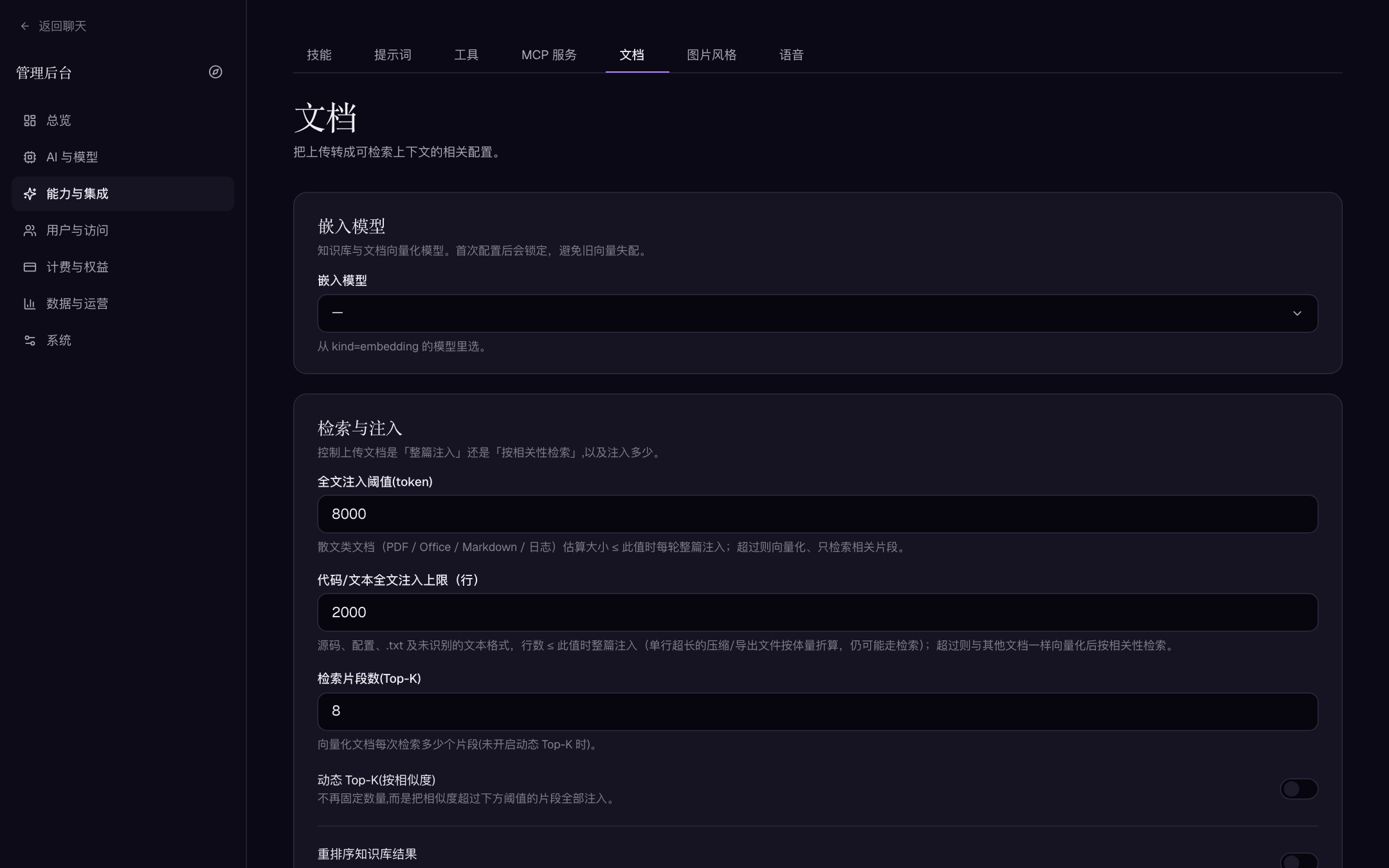
Aivory v2.4.7 and later. Relevant screens: "Capabilities & integrations → Documents" (RAG and embedding settings), "System → Storage & uploads", and the user-facing knowledge bases under /kb. Screenshots show the Chinese admin UI; English labels are cited inline.
Knowledge bases let the model retrieve document snippets from a permission-scoped corpus before answering. Reliable RAG is not just "upload a file": it depends on a working embedding model, a consistent vector dimension, successful parsing and indexing, and access control over users and workspaces.
Workflow and acceptance points
upload → validate type/size and store the raw object → parse (text/tables/OCR)
→ chunk → embedding model produces vectors → write to the vector backend
→ at question time, retrieve only within the caller's permission scope → inject snippets
Documents move through pending → parsing → embedding → ready / failed in an async queue; while ingest is unfinished, the composer blocks sending. Wait for the ready state, then test retrieval with a sentence exactly verifiable in the file. On failure, keep the original file and read the task error and app logs — do not re-upload the same file repeatedly to mask the root cause.
Ingest states and the async queue
| State | Meaning | Admin action |
|---|---|---|
| pending | Stored and queued, waiting for a worker | Normal wait |
| parsing | Extracting text/tables or calling OCR | Large scans legitimately take a while |
| embedding | Chunking and vectorizing now | Watch for a stalled heartbeat |
| ready | Searchable | Run the one-sentence retrieval acceptance |
| failed | A stage errored | Read the task error and logs, fix, then re-ingest the original file |
Full-edition ingest runs on the Redis queue (asynq) with two lanes — rag (slow: OCR and heavy documents) and rag-fast (plain text) — each 4 workers deep; Personal uses an in-process queue with identical behavior but single-process throughput. A heartbeat/recovery loop re-queues abandoned documents, and each document pipeline has its own timeout, so a giant scan that keeps failing should be split outside Aivory rather than retried forever.
Formats and parsing paths
| Input | Path | Notes |
|---|---|---|
| txt / md / source code / csv / json / yaml | Local read | Small source/text files may be injected whole per the line cap |
| PDFs with a text layer, docx / pptx / xlsx | Local structured parsing | Heading breadcrumbs shape the chunks |
| Scanned PDFs / image-based documents | Requires MinerU OCR | Needs object-storage presigned URLs — see below |
| Images (png/jpg/gif/webp/bmp…) | Multimodal attachments; OCR when text is needed | Common raster formats bypass the extension allowlist |
Embedding model and dimension
- Add an embedding-kind model under "AI & models → Models" (a channel supporting
/v1/embeddings, with the realrequest_idand Dimension filled in). - Go to "Capabilities & integrations → Documents" and select it under the embedding-model section.
| Field | Description | Example | Default |
|---|---|---|---|
| Embedding model | Vectorization model for knowledge bases and documents; selectable only from kind=embedding models | text-embedding-3-small | unconfigured |
To prevent stale chunks from mismatching the vector store, the embedding model cannot be changed once configured — the lock notice on the page is intentional. If you truly must switch (new vendor or dimension), plan the vector rebuild for every affected knowledge base first, and never delete the only copy of the original files: vectors can be rebuilt, lost documents and metadata usually cannot. If the selected model is deleted, the page shows a dangling-model warning; pick a replacement and re-index all knowledge bases.
Deployment-level fallback: the EMBEDDING_BASE_URL / EMBEDDING_API_KEY / EMBEDDING_MODEL / EMBEDDING_DIM environment variables (defaults text-embedding-3-small / 1536) apply when the admin UI has no selection. With nothing configured at all, Aivory falls back to a built-in local hash embedder — 256-dimensional, dev-grade — fine for trials, not a long-term semantic-search baseline.
The critical invariant: EMBEDDING_DIM, the model record's Dimension, and the model's real output size must agree. Qdrant isolates collections by dimension (aivory_c<dim>), so incompatible vectors are walled off — which presents as "retrieval returns nothing".
Vector backend: Personal vs Full
- Personal (SQLite embedded vectors)
- Full (Qdrant)
VECTOR_BACKEND=sqlite(pinned by the official Personal compose); vectors live in thevector_pointstable ofaivory.dbwith exact cosine search.- Database, uploads, artifacts, and backups all sit in one
DATA_DIR; single instance only, never on a network filesystem. - You do not need — and should not add — Qdrant just for RAG.
VECTOR_BACKEND=auto: settingQDRANT_URLactivates Qdrant; the official Full compose already runs an internalqdrantservice (never port-published).- Don't expose Qdrant's port or point the app at uncontrolled instances; collections are separated by dimension automatically.
VECTOR_BACKENDis deployment topology; invalid combinations abort boot. Read Environment variables before changing topology.
Either way the 60-table schema is identical: even Full creates vector_points but keeps it empty, so logical backups and migration tooling stay engine-agnostic. Domain bindings and passkey credentials are relational rows in the same database and are included in the normal backup flow.
Retrieval and injection parameters
The "retrieval & injection" section on "Capabilities & integrations → Documents" decides whether an uploaded document is injected whole or retrieved by relevance:
| Field | Description | Default |
|---|---|---|
| Full-text injection threshold (tokens) | Prose documents (PDF/Office/Markdown/logs) estimated at or below this size are injected in full every turn; above it, they are vectorized and retrieved | 8000 |
| Code/text full-text cap (lines) | Source, config, and .txt files at or below this line count are injected whole; longer ones go through retrieval | built-in |
| Retrieved snippets (Top-K) | Snippets fetched per query for vectorized documents (when dynamic Top-K is off) | 8 |
| Dynamic Top-K (by similarity) | Instead of a fixed count, inject every snippet meeting the threshold | off |
| Similarity threshold (0–1) | Cosine-similarity floor | 0.5 |
| Rerank knowledge-base results | Uses a separate OpenAI-compatible rerank service only when the conversation attaches a knowledge base; falls back to the original order on failure | off |
Rerank fields: Base URL must end in /v1 (the backend appends /rerank; it does not go through model channels), API key (sent as Bearer; blank if the service is unauthenticated), and model name.
Retrieval core behavior (AIVORY_* variables, see Advanced environment variables): dense-vector and keyword legs each take top-30, fused by reciprocal-rank fusion (k=60); a 30-second online budget, on which retrieval fails open — the answer continues without evidence; structure-aware chunking targets ~2000 characters per child chunk, ~4800 per parent, 250 overlap.
Retrieval-quality tuning quick lookup
| Symptom | Adjust first |
|---|---|
| The answer is clearly in the document but nothing is retrieved | Lower the similarity threshold or raise Top-K, or enable dynamic Top-K; confirm the document is ready |
| Plenty of hits, lots of noise polluting the answer | Raise the similarity threshold, lower Top-K, or enable reranking |
| Small documents get answers ripped out of context | Lower the full-text injection threshold so that size class is injected whole |
| Everything broke after switching embedding models | Dimension or model mismatch: reconcile the locked model, dimension, and rebuild results |
| Long documents sporadically get uncited answers | The 30 s retrieval budget failed open: check embedding-service latency and network |
| Exact part numbers or IDs miss | Lean on the keyword leg: raise Top-K, or verify the document wasn't treated as vector-only |
Document parsing and OCR (MinerU)
- Born-digital files (text, PDFs with a text layer, Office, text inside images) go through the local parsing chain.
- Scans, image-based PDFs, and complex layouts need the MinerU cloud parser. Configure it via the
MINERU_API_URL/MINERU_API_KEYenvironment variables (boot defaults) or the MinerU section on "Capabilities & integrations → Documents" (MinerU endpoint, API token; the cloud default ishttps://mineru.net).
Non-plain-text uploads reach MinerU through S3/OSS: the backend uploads directly and hands MinerU a presigned URL. Configure complete S3 or Aliyun OSS under "Storage & uploads" before enabling MinerU, or the page refuses to save ("MinerU requires a complete S3 or Aliyun OSS configuration"). Local-storage single-node installs cannot use the MinerU path.
Parse-failure triage, in order:
- File not corrupted, within upload limits, not a password-protected PDF.
- Parsing service network, auth, quota, and timeouts.
- Object-storage URL reachable by the parsing service (presigned download works).
- Document task status, app logs, and the provider response, to tell apart parse, embedding, and vector-write failures.
Never expose a private bucket, internal file server, or database to the public internet just to make OCR succeed.
Storage and upload policy
"System → Storage & uploads" governs object placement, upload limits, and archive retention (full fields in System, backup, and operations). The RAG-relevant boundaries:
| Item | Rule |
|---|---|
| Server hard cap | MAX_UPLOAD_BYTES, default 50 MiB; no admin-UI limit may exceed it |
| Image cap | Admin "Max image upload size (MB)", default 5 MB |
| Non-image file cap | Admin "Max file upload size (MB)"; 0 = inherit the server cap |
| Type allowlist | Admin upload_allowed_extensions; blank uses the safe default set (Office/PDF/text/images/common source). Executables, macro documents, archives, and .html/.svg are deliberately excluded. The last extension decides (evil.pdf.exe is treated as exe); common raster image formats are always allowed |
| Reverse proxy | The proxy's request-body limit must be ≥ the app limit, or uploads surface as 413/connection resets |
Before raising limits, re-evaluate disk/object-storage cost, parser memory, and backup size.
Permissions, citations, and sharing
- Knowledge bases are not a global public search: retrieval covers only the personal, project, workspace, and explicitly shared libraries the asking user can access (read-only vs upload-allowed).
- User-side flow: create a knowledge base in the app → consistent embedding dimension → upload files → wait for indexing → attach in a conversation or project. Admins can audit every user's libraries, projects, and generated images under "Data & operations → Content resources", and inspect, preview, or delete files under "Files" (deletion clears the database record, the vector index, and the on-disk object together).
- Citations and sharing: publicly sharing an answer embeds its cited snippets, attachment previews, and tool artifacts into a read-only, cost-stripped snapshot. Check before sharing; after user deletion, workspace removal, or permission changes, verify old share links and libraries no longer expose content.
- Project-level automation: a project can bind one knowledge base and enable "auto-add uploads", so user uploads land in the library and conversations default to searching it; with the conversation's
rag_modeon auto, the file-routing model decides skip/retrieve/full-text. When explaining "why wasn't this library used", check those two switches first, then the thresholds.
End-to-end acceptance checklist
Run this once before trusting the feature:
- Admin side: the embedding model is configured and its recorded dimension matches the model's real output ("Capabilities & integrations → Documents").
- On the user side, create a knowledge base and upload a small text file containing a distinctive string.
- Wait for the status to reach ready; the composer blocking sends until indexing completes is normal.
- In a new conversation, attach the library and ask using the exact sentence from the file: the answer should cite it, with the citation pointing at the right file and snippet.
- Ask the same question from a second account: it must not retrieve the first account's content — cross-user visibility is a configuration bug, not model hallucination.
- Test a table document and a scanned sample separately: tables should hit via structured chunks (chunk types include text/parent/table/image_caption); scans need both object storage and the MinerU path working.
Capacity, cost, and FAQs
| Dimension | Facts |
|---|---|
| Single-document size | The pipeline enforces a per-document timeout (on the order of 70–75 minutes); split giant scans outside Aivory first |
| Concurrency | Full: two lanes × 4 workers; Personal: bounded by the single process — batch large imports |
| Storage growth | Vector volume ≈ chunks × dimension × 4 bytes; 1536-dim with ~2000-char child chunks adds a few tens of MB per ~10M characters of Chinese-scale corpus |
| Query latency | Retrieval fails open at 30 s; a slow embedding service first shows up as "fewer citations", not errors |
Frequently asked:
- "How do knowledge bases relate to projects?" A knowledge base is a document collection; a project is a unit of work (it can bind one knowledge base and auto-add uploads). A conversation can attach multiple knowledge bases.
- "Do vectors disappear when I delete a document?" Yes — deleting a document cascades to its chunks and vectors; deleting via the Files page clears record, index, and disk object together.
- "If a knowledge base is public, who sees it?" Library-level
is_publicopens it to workspace members only — not the internet. The only internet-visible artifacts are conversation share links.
Switching models, rebuilding, and backups
Standard procedure for changing the embedding model or migrating vector stores:
- Record the old model, old dimension, and the business scope of affected knowledge bases.
- Add the new embedding model and validate dimension and retrieval quality on a small sample.
- Perform the switch in the admin UI (mind the lock rule and dangling-model recovery path above).
- Use Vector check under "System → Backup & Migration": run "Check vectors" first (report: expected / present / missing / empty / skipped), then "Rebuild missing vectors" for the gaps.
- Accept retrieval against both old and newly uploaded content; keep the old model online until every index is done.
Backups must cover relational data, vectors, and raw files together: for Personal, the whole DATA_DIR; for Full, PostgreSQL, Qdrant, Redis, the sandbox archive volume, and DATA_DIR form one consistency unit. The full-backup ZIP already packages Qdrant vectors, and import restores them automatically, reporting the result. Details: Upgrades, backup, and restore.