Channels, models, and policies
Aivory v2.4.7 and later. This covers the "AI & models" rail: Channels / Models / Model tags / Model policy / Context & memory / Moderation. Screenshots show the Chinese admin UI unless noted; English labels are cited inline.
A channel stores "how to connect to an upstream provider" (protocol type + Base URL + credentials); a model stores "which specific model can be called through that connection" (request ID + capabilities + pricing + policy). Managing them separately lets the same model ID coexist across different accounts, regions, gateways, or cost policies.
The minimum conditions for users to chat: an enabled, working channel; at least one enabled chat model linked to it; and a valid "Default chat model" in the model policy. Full walkthrough: Administrator first-run setup.
Planning channels
| Scenario | Recommendation |
|---|---|
| Same provider, prod and test keys | Two channels, names marking the environment; never let a test key back the default model |
| Same model reachable via two gateways | Two channels + two model records for independent ordering, disabling, or fallback |
| Splitting by team, region, or cost | One channel per contract, region, or budget pool |
| Provider offers no model-listing endpoint | Keep the channel and "New model" manually; list import is not a precondition for using a channel |
Channel API keys belong only in the admin UI (stored server-side in the channel record; the UI shows masked state). Never put provider keys into VITE_* variables, frontend pages, public examples, browser request parameters, or application logs.
Creating a channel: field-by-field
The dialog shares these fields across all types:
| Field | Description | Example | Default |
|---|---|---|---|
| Name | Admin-facing label; never affects requests | OpenAI prod | required |
| Type | Upstream protocol family: OpenAI / Claude / Gemini / Mock, etc. | OpenAI | required |
| API format | Chat models only; selects the conversation protocol variant | chat / responses | per type |
| Base URL | Upstream API root; blank uses the vendor default | https://api.openai.com/v1 | vendor default |
| API key | Server-side secret; blank when editing keeps the saved key | sk-… | empty |
| Enabled | Disabling instantly removes every model under it from new requests | on | on |
- OpenAI-compatible
- Anthropic Claude
- Google Gemini
- Mock (integration testing)
- Set Type to OpenAI; nearly every compatible gateway (Azure-compatible endpoints, one-api-style routers, local Ollama/vLLM OpenAI endpoints) lives in this family.
- Base URL: the upstream API root, which may end in
/v1,/v2,/v3, or a custom gateway path; blank meanshttps://api.openai.com. Pasting the web console address instead of the API address is the single most common mistake. - API format: OpenAI has two conversation protocols (chat completions vs responses). Trust the provider docs; the same model name does not imply both work.
- To also use embedding or image capabilities from this channel, just create models of those kinds under it — the channel itself doesn't switch.
- Set Type to Claude; signing and headers follow the Anthropic protocol.
- Blank Base URL means the official endpoint; behind a proxy gateway, enter the compatible root the gateway exposes.
- Claude capability differences (vision, tool calling) vary by model — trust the checkboxes on each model record, not the family name.
- Set Type to Gemini; blank Base URL uses the official endpoint.
- Function calling and multimodal support differ noticeably across Gemini generations; validate "Deep research" and "Vision" with a test conversation before enabling for users.
- Issues no real network calls and returns controlled fake responses — for frontend work and demos.
- The
ENABLE_MOCK_PROVIDER=trueenvironment variable seeds a mock channel automatically; never enable it in production or point the default policy at a mock model.
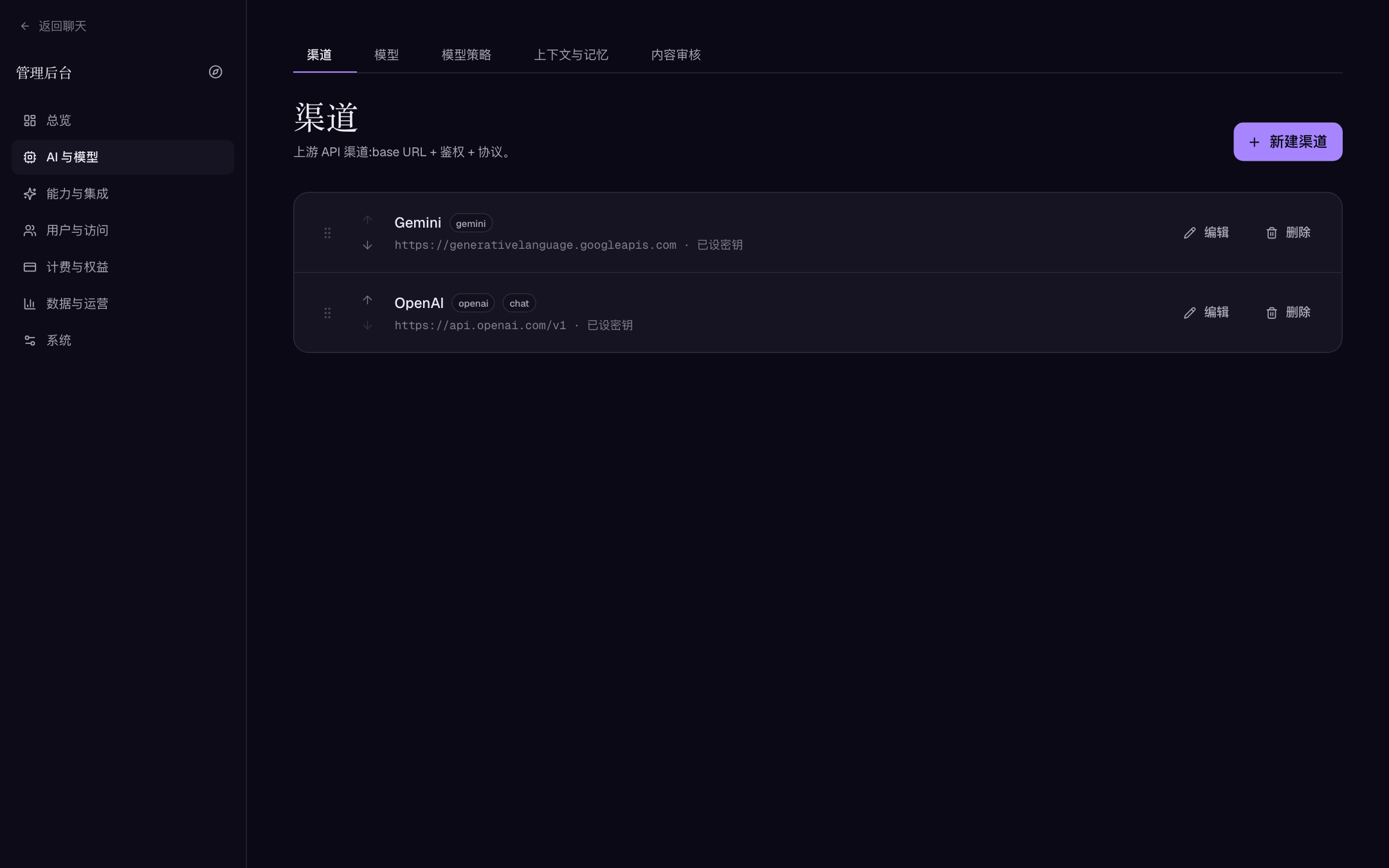
Channel list and editor dialog. "Key set / no key" shows state only; key contents are never echoed back.
Validate immediately after saving
- Save and enable the channel.
- Click "Fetch from upstream" in the dialog: a returned model list proves address, key, and network all work.
- A failed listing does not mean the channel is unusable — many providers restrict listing. Add one known model ID and send a real short request to verify network, auth, model entitlement, and quota.
Model discovery and bulk import
Three paths:
- Fetch models from a channel (recommended for routine deltas): on "AI & models → Models", choose a saved channel; Aivory reads its current upstream list, separates "available / already added", and hides entries Aivory doesn't support yet. Bulk-add what you tick; duplicates are skipped with an explicit report.
- "Fetch from upstream" inside the channel editor: tick models while creating the channel — best for first-time onboarding.
- Manual "New model": for providers with no listing endpoint, private gateways, or inference-only keys.
Auto-import doesn't decide what should be user-visible, whether a model is chat/image/embedding, or whether pricing and context descriptions are right. Review enabled state, capability flags, and billing fields record by record before exposing anything.
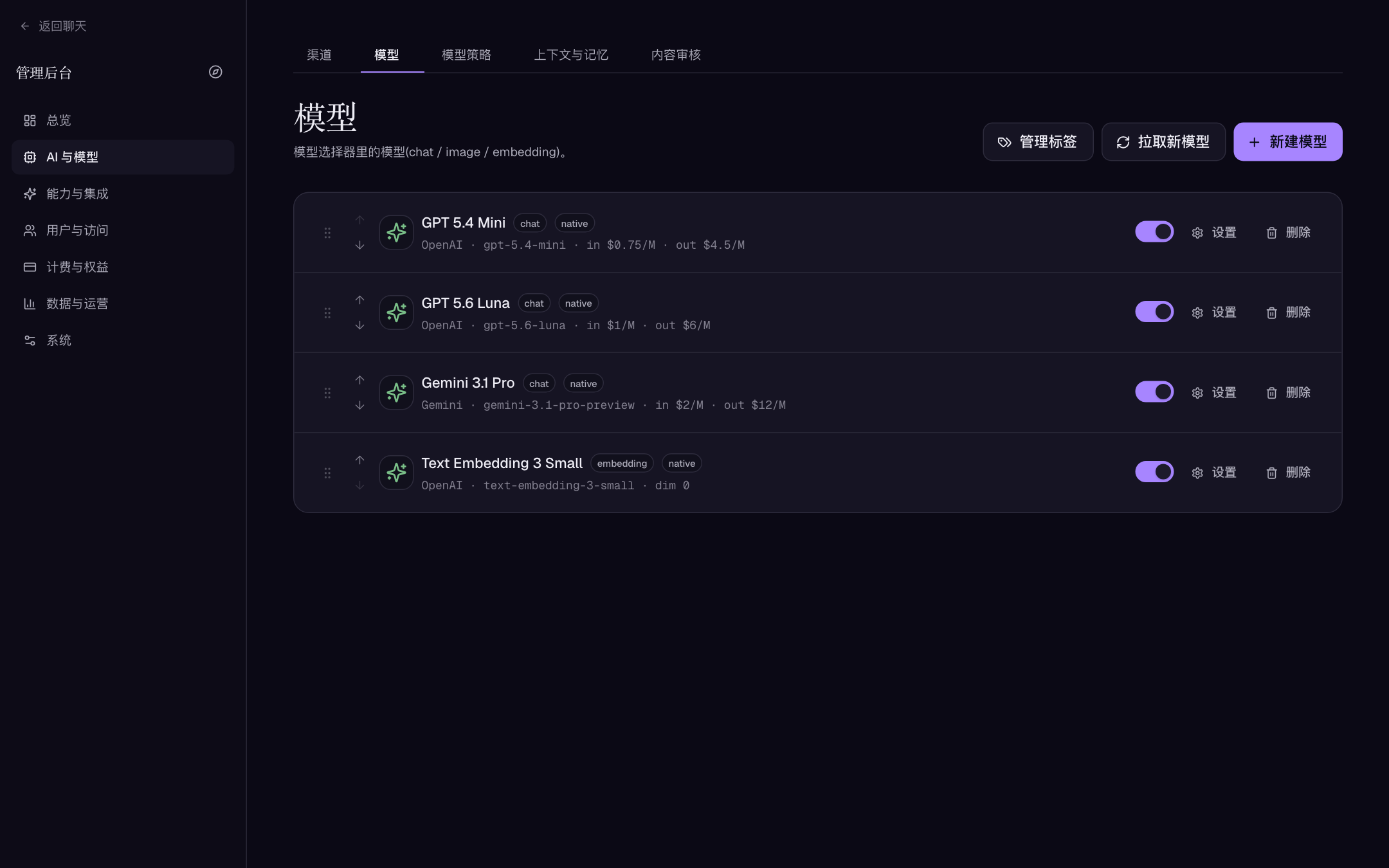
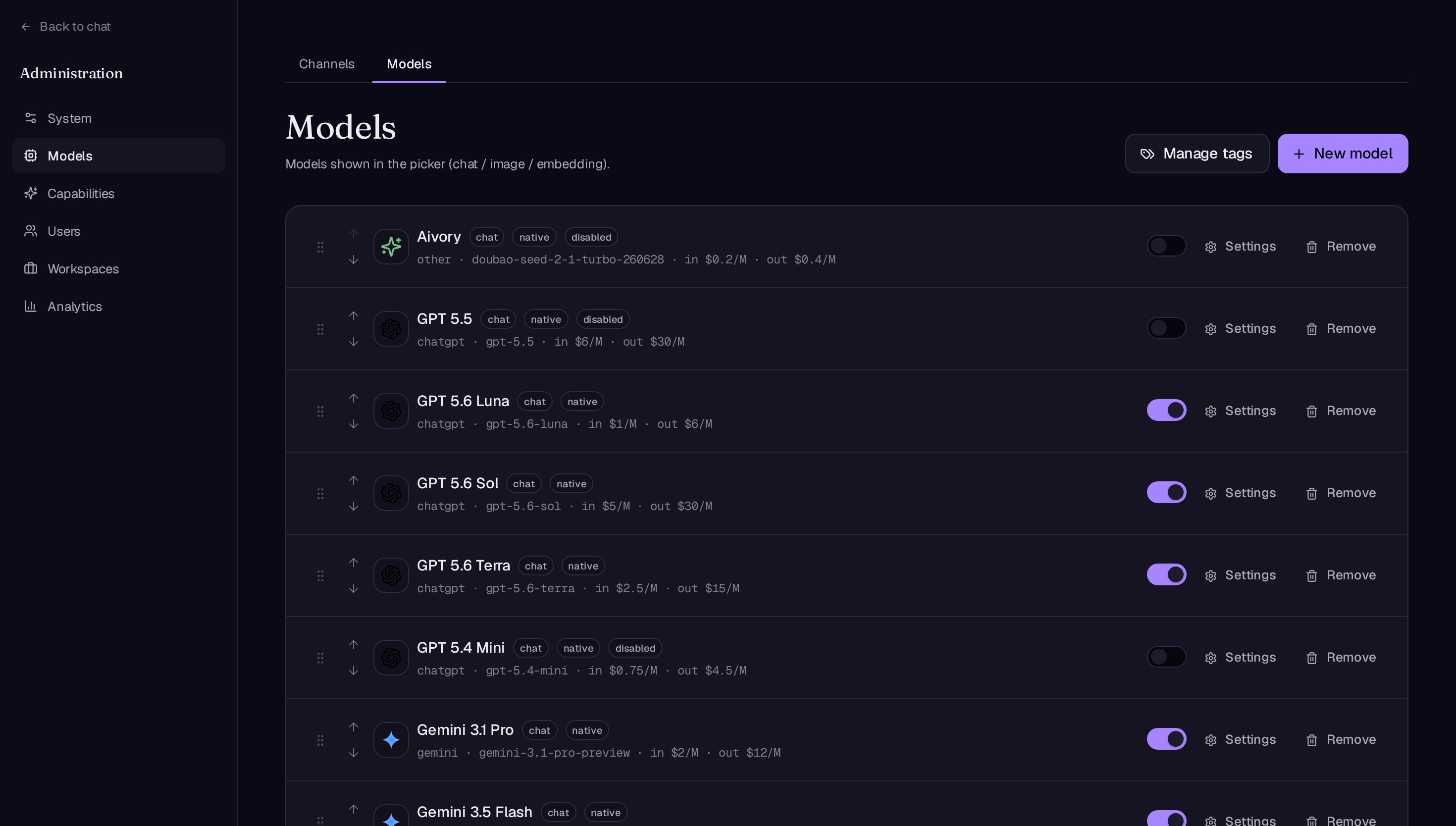
Models list. The same request ID can exist once per channel without conflict.
Model record fields
The editor is grouped into Basic / Chat behaviour / Pricing / Permissions / Tags / Skills / Image generation. Core fields:
| Field | Description | Example | Default |
|---|---|---|---|
| Channel | Upstream used for requests | OpenAI prod | required |
| Fallback channel | Retries automatically before the user sees an error; must match the primary channel's type and format — only URL and key may differ | backup gateway | none |
| Kind | chat / image / embedding | chat | required |
Label / request_id | Display name for humans; the request ID is the literal model ID sent upstream | GPT flagship / real ID | required |
| Tool mode | native (function calling) / prompt (simulated) / none | native | per kind |
| Built-in tools | Platform tools pre-ticked for this model ("default all" or custom) | custom | all |
| MCP tools | MCP services pre-ticked for this model; only globally enabled, already-synced services can run | custom | off |
| Provider-hosted tools | None by default; add explicit request JSON per tool only after its own security review | — | empty |
| Vision / Stream / Deep research | Capability declarations affecting upload entry and research mode | on | per model |
| Fast model | Marks THE model for "Fast" mode: hidden from the advanced picker, name never shown to users, deep research forced off | — | no |
| System prompt | Appended to every request for this model | — | empty |
| param_controls / extra upstream params (JSON) | User-adjustable parameter mapping and merged extra JSON; precedence: built-in params > param controls > extra params | {"temperature":0.7} | empty |
| Dimension | Required for embedding models; must equal the model's real output size | 1536 | — |
| Compaction threshold (tokens) | Overrides the global trigger for this model; 0 = use global | — | 0 |
| Input/output/cache-read/cache-write price per 1M, price per image | Drive credit deduction and the Usage & billing analytics | per provider | 0 |
| Enabled (visible to users) | Off removes it from pickers and new requests | — | on |
"A model appears in the picker but the first request fails" almost always means capability flags disagree with the upstream: non-function-calling models marked native, chat models marked embedding, or assuming every model handles vision/JSON/streaming. Run one minimal request per claimed capability.
Model policy and context compaction
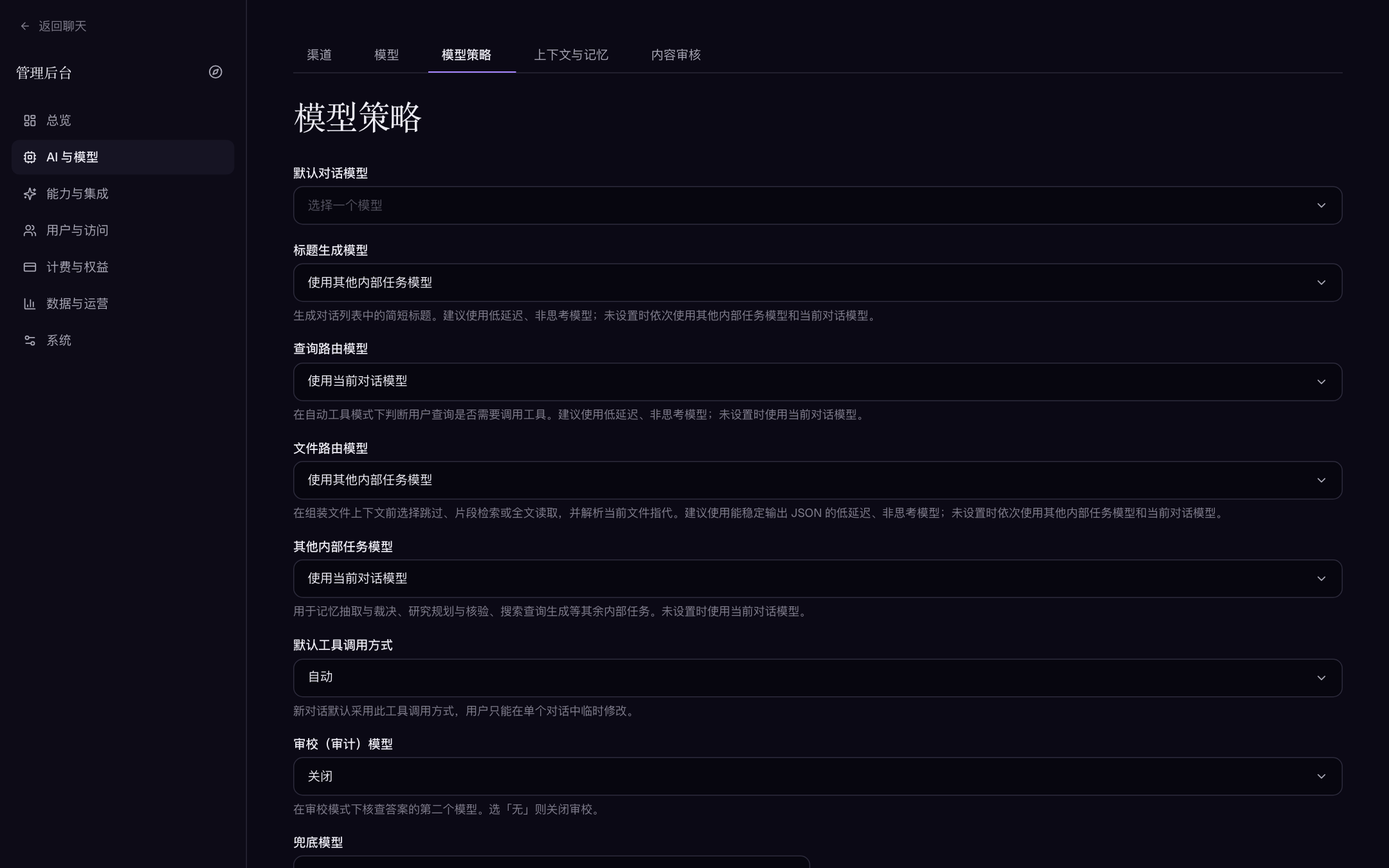
"AI & models → Model policy" holds system-level model selection. Empty slots fall back to the conversation model (or task model) as labeled; the default chat model is the only hard requirement:
| Field | Purpose | Guidance |
|---|---|---|
| Default chat model | Main model for new conversations | validated, cost-controlled |
| Title generation model | Titles in the conversation list | low-latency, non-thinking |
| Query routing model | Decides whether a query needs tools in auto mode | low-latency, non-thinking |
| File routing model | Chooses skip / snippet retrieval / full-text before assembling file context | reliably emits JSON |
| Other internal task model | Memory extraction, research planning and verification, search query generation | stable mid-tier |
| Verify (auditor) model | Second model auditing answers in review mode | pick "None" to disable |
| Image prompt model | Polishes prompts before drawing | "None" to skip |
| Default tool mode | Default tool-calling mode for new chats (auto / on / off) | auto |
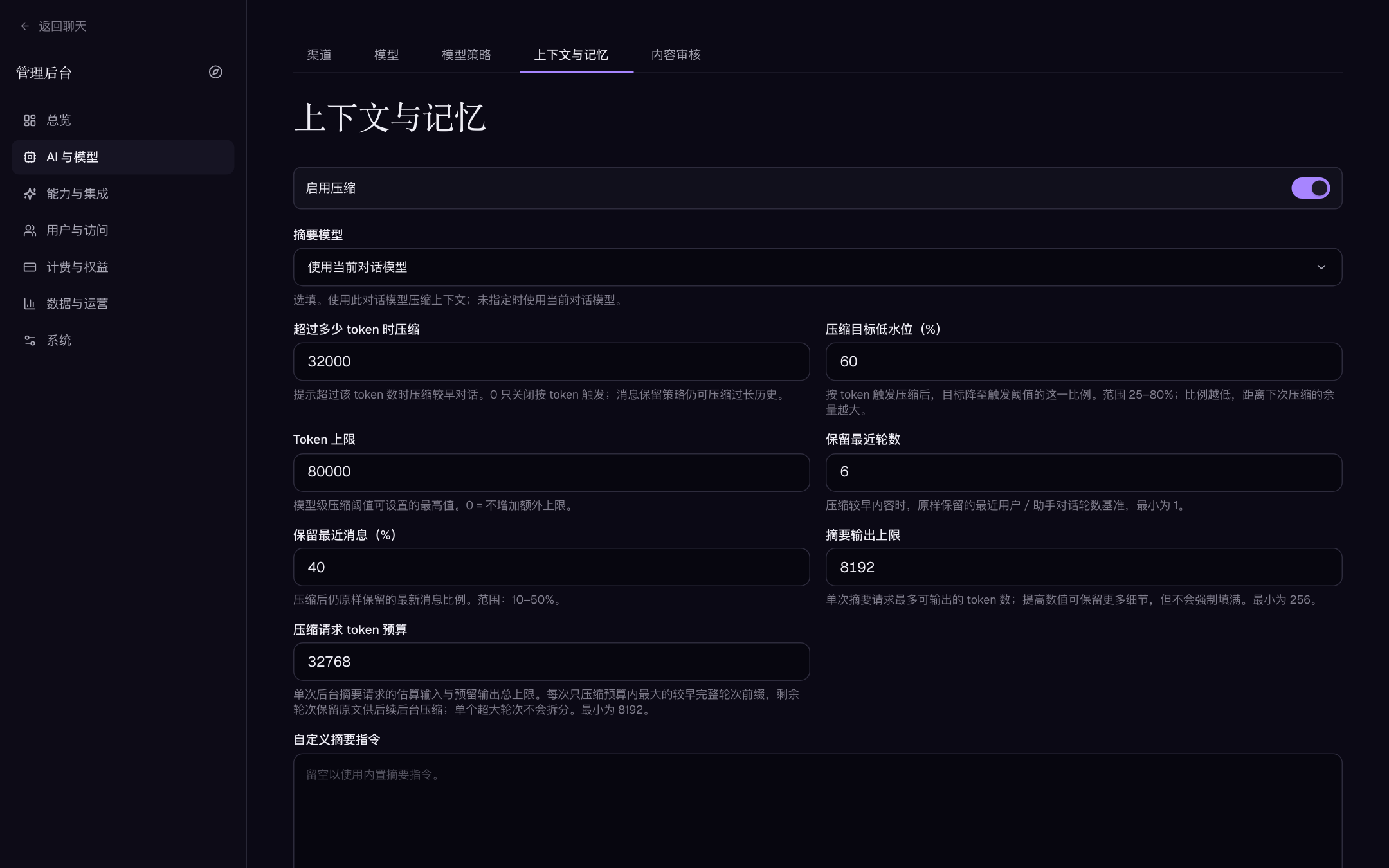
"AI & models → Context & memory" governs long-conversation compaction and memory. Key values and defaults:
| Field | Description | Default |
|---|---|---|
| Enable compaction / Enable memory | Master switches | on / on |
| Keep recent rounds | Recent turns preserved verbatim during compaction | 6 |
| Compact above (tokens) | Estimated prompt size that triggers compaction | 32000 |
| Target low-water (%) | Post-compaction target as a share of the trigger (25–80) | — |
| Retain latest messages (%) | Share of newest messages kept verbatim (10–50) | — |
| Summary output cap | Max output tokens per summarization request | 8192 |
| Compaction request budget | Total input + reserved output budget per background summary request | — |
| Summary model | Blank uses the current conversation model | empty |
Ordering, tags, visibility, and quotas
- Model tags ("AI & models → Model tags") feed picker filters — make operational semantics like "recommended / economy / long-context / image" explicit.
- Visibility and per-model allowances go through user groups and the model's Permissions block: model-group quotas (by cost or call count, rolling window) decide which groups may use a model and whether overage burns credits or is refused. See Plans, credits, and payments.
- Start by exposing only a few validated models; widen by cost, context, speed, or data-handling boundaries.
Change management and troubleshooting
The safe channel/model change flow:
- Record the current default model, every policy slot, and the plans, workspace policies and quotas referencing the model.
- Create or edit the channel and store new credentials.
- Send short requests with the target model; check streaming, tools, image, or embedding behavior in practice.
- Only then change enabled state, ordering, and global policies.
- Watch Usage, error records and user feedback; retire the old channel/model once steady. When rotating keys, validate the new key before disabling the old credential — never delete your way out of a live conversation.
Common test-connection failures
| Symptom | Check first |
|---|---|
| 401 / auth failure | Key copied fully and not revoked; leaving the key blank while editing keeps the old value — it does not clear it |
| 404 / model not found | request_id matching provider docs character-for-character; right API format (chat vs responses) |
| Base URL errors | Console web address pasted instead of API root; missing version path a gateway requires |
| Listing fetch fails | Whether the provider allows listing, server egress and DNS, inference-only key |
| Timeouts / dropped streams | Network path and proxy timeouts; a reverse proxy buffering the SSE stream (Domain, HTTPS, and OAuth) |
| Models exist but chat fails | Model kind, enabled state, channel enabled state, default policy pointing at it |
| Same ID hits the wrong upstream | The channel linked to the model record — not the display name |
| Fallback channel never fires | Fallback must share the primary channel's type and API format, or it won't retry |
Disabling a channel instantly makes all its models unusable for new requests; deleting a channel cascades to its model records. Before disabling or deleting a model, confirm no policy slot, verifier, image-prompt or summary model, workspace policy, plan quota, or user favorite references it.